
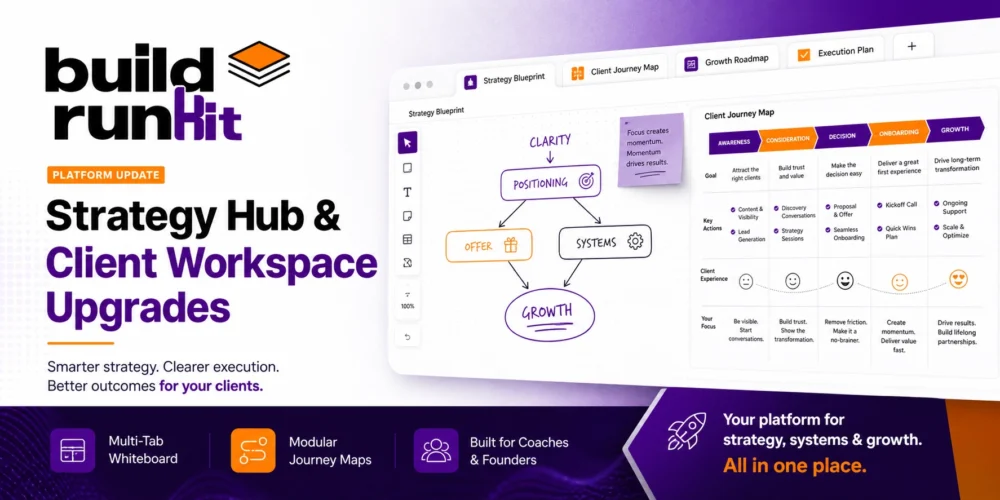
We are excited to share our latest Strategy Hub Whiteboard Upgrades, bringing flexible visual planning and real-time canvas tools directly into your team's workspace. When scaling a mentoring practice or keeping a growing team aligned, standard project dashboards often fall short. Managing multiple client tracks requires secure, flexible business coach toolkit software architectures that bring clarity to complex operations. Adopting a unified business coach toolkit app is critical to keeping founders, mentors, and teams focused on execution without getting lost in technical clutter.
This July, we rolled out a major series of platform enhancements across our core tools. We have added high-utility features to ensure our ecosystem remains a top-tier business coach toolkit management tool designed for fast-moving startups and their advisers.
Here is exactly what went live in our business coach toolkit dashboard this week:
1. Strategy Hub Multi-Tab Whiteboard
Planning and visual mapping should never feel constrained by a single, crowded canvas limit. To give teams room to map out complex architecture, strategy frameworks, and operational flows, we replaced the previous thoughts feature with an interactive Whiteboard powered by Excalidraw, bringing these Strategy Hub Whiteboard Upgrades into full effect.
- Multi-Tab Whiteboard Canvas: You can now maintain up to 10 independent canvases within a single board interface. The tab bar supports native drag-and-drop reordering, inline tab renaming, duplication, and instant deletion directly within your workspace view.
- Database Syncing & Persistence: A robust background saving system automatically syncs all whiteboard formatting, shapes, and structural layouts directly to the database. This enables clean, real-time persistence and cross-device editing across your entire team.
2. Coach App Client Workspace & Modular Journeys
Gaining full visibility into client execution helps advisers deliver targeted, high-impact feedback faster without interrupting active founder workflows or setting up lengthy manual review calls.
- Client Workspace Read-Only View: We launched a dedicated "Client Workspace" feature, providing coaches with a clean, read-only view into their clients' active environments for complete oversight.
- Contextual Assistance: We upgraded the client messaging trigger. When a client requests help using the "Ask to coach" button inside their dashboard, the system automatically attaches the exact substage context so you know where they are stuck before you even open the message.
- Modular Journey Builder: The Journey Builder now supports adding complete master journeys as well as individual, standalone substages. As part of this push, we migrated the full Startup Launch Journey to offer standalone pre-built modules—including the Founder Fit Scan, ICP Generator, and Competitive Analysis—giving you total flexibility when assigning client work.
Advanced Team Tips for Founders
To extract maximum utility from these platform updates, structure your workspace around these three lean execution principles:
- Organize Strategic Thoughts Cleanly: Use the new 10-tab whiteboard limit to separate your product roadmaps, operational workflows, and go-to-market strategies within a single, organized strategy board.
- Track Task Timelines Accurately: Set explicit task start dates inside Goldilocks Projects to generate clean Gantt chart timelines that accurately reflect your actual work cycles and team availability.
- Streamline Coach Feedback Loops: Prompt your clients to use the contextual help trigger directly within active substages so you receive full background context instantly without back-and-forth emails.
Goldilocks Suite & Platform Performance
Beyond our headline coaching and strategy features, we executed a comprehensive sweep of technical upgrades across the Goldilocks suite to accelerate data handling, invoice management, and project execution speed:
- Goldilocks Projects Updates: We implemented full start-date support for project tasks across backend validation schemas, databases, and Gantt charts. We also reduced the visual footprint of project views for large task lists, corrected PDF report pagination so notes don't get cut off between pages, enabled full comment management, and added task descriptions to Excel data exports.
- Goldilocks Invoices & Simple Notes: We integrated a new ServerDataTable engine for invoice and customer routes to support server-side pagination and filtering. This instantly resolved performance bottlenecks during invoice creation, table navigation, and note-taking.
- System Reliability & UX: Standardized file naming conventions across component architectures, upgraded 401 rate-limit error handling across all API interfaces, and updated assigned progress display indicators for cleaner dashboard tracking.
Featured Roadmap Items
Strategy Hub Multi-Tab Whiteboard A flexible workspace visual tool powered by Excalidraw, featuring up to 10 independent, re-orderable tabs per board alongside real-time database formatting synchronization across devices.
Client Workspace Read-Only View A dedicated oversight view giving coaches complete visibility into active client workspaces, paired with context-aware messaging links to resolve substage bottlenecks immediately.
Modular Journey Engine Flexible Journey Builder support allowing coaches to assign full program tracks or individual standalone modules like the ICP Generator and Founder Fit Scan without locking clients into rigid structures.