
My 5 Feature
Summary
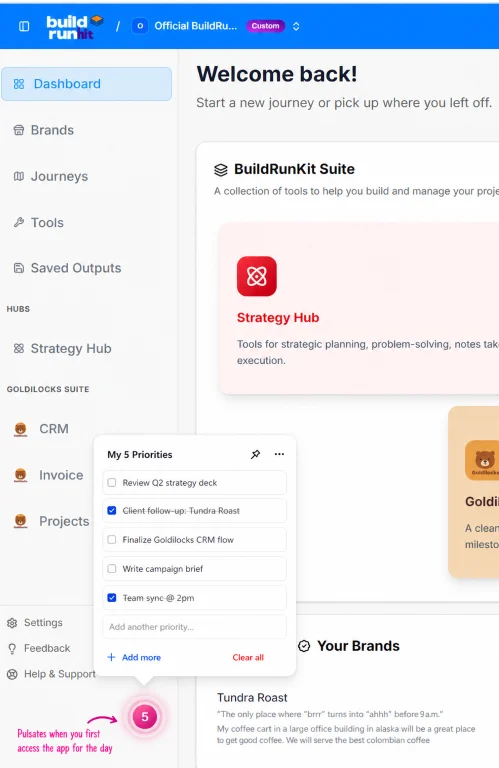
The My 5 feature of the BuildRunKit is meant to replace that notebook you always have at hand -- to capture your priorities for the day. It's meant to be at your fingertips!

On our small team, we have to wear all the hats. It's important for us to have all the information we need in one place. Part of that is custom fields. We have an access code (it's an identifier, not a secure key or anything). We need it on our customer's record, where we can find it. With custom fields, that base is covered. Check out how easy it is to implement.

Custom field Setup
You won't have to pay for a day-long engagement for this customization. It's simply filling out this table. Once you fill out this table, we'll know to show a place to enter that data and to view it on the contact or the deal, as required.
Entering and viewing custom field data
So, we're not helping you build a custom app that requires a development team -- we're just giving you access to your custom data. In the record edit, it's easy to find.


Task Sharing
Task sharing sounds basic. We've always been able to do it, sort of. Except, each task didn't have its own identifier; rather, it was just part of the task board. Now, each one has an identifier, so we can share the link directly to the task. It's great for when you want to call someone's attention to something that's waiting. So just click the little share button to get the URL onto your clipboard.
Bulk Task Entry
So, it's not an import - not exactly. It's better. Wherever your tasks are coming from, whether meeting notes or another system, it's easy to get them into this task:description format. It's a great way to get 20 or 50 tasks into the system at once. Sometimes, I just kee the bulk task screen open during a team call, so I can capture todo's. We can always fill in the details later. Task management got a lot faster with this feature.


Task Attachments
It'd be a hard sell to get people to trust our team for complex work like development tasks without the attachments features. Sometimes, you need to attach screenshots or specs or any sort of text file or other context piece when you submit a task for collaboration. So, now you can do that. Task management is sure easier when you have all the information.
Task Migration (move / copy)
Finally, an oft-requested feature that is a huge time savings for a task manager. Imagine the scenario: You have 225 items in your roadmap. 37 of them just got approved and need to be moved to the current dev sprint. You don't want to do that by hand. So, just move it to the other list - or copy it if you still want a copy on your roadmap. What a relief - Efficient task management means not typing things twice!

